 -96%
MT4
-96%
MT4
GoldPulse MT4 EA
- Fully automated gold trading system
- Designed specifically for XAUUSD
- Price action based strategy
- Intelligent grid recovery system
- Real-time margin protection
- Automatic basket profit closing
- Advanced news filter integration
- Economic calendar auto-update
- Session-based trading filter
- Spread protection system
- Automatic lot sizing or fixed lot
- Drawdown monitoring system
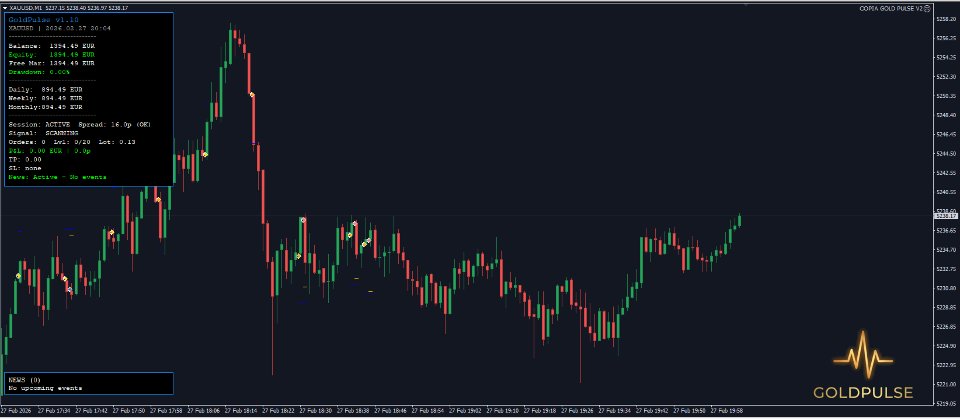
- Professional chart information panel
- Floating profit and grid level display
- Automatic trade recovery after restart
- Stable long-term trading logic
- Compatible with ECN and STP brokers
- Works on MetaTrader 4
GoldPulse MT4 is a professional automated gold scalping Expert Advisor designed exclusively for trading XAUUSD on the MetaTrader 4 platform. Built with a strong focus on price action analysis and disciplined trade execution, the EA identifies high-quality trading opportunities by analyzing market movements bar by bar. The system is designed to trade only when clear price momentum exists, avoiding unnecessary trades during uncertain market conditions. GoldPulse MT4 integrates a structured recovery system that manages drawdown intelligently while maintaining strict margin control to prevent overexposure. One of the key strengths of GoldPulse MT4 is its advanced live news filter, which connects to the ForexFactory calendar and automatically pauses trading during high-impact economic events. This helps protect trading accounts from unpredictable volatility. With flexible lot sizing, risk-based position control, session filters, and spread protection, GoldPulse MT4 provides a stable and disciplined automated trading experience. The EA is designed for long-term operation under real market conditions rather than unrealistic backtest performance.
Login to checkout
Technical Specifications & Requirements
Open MetaTrader 4.
Click File → Open Data Folder.
Open MQL4 → Experts.
Copy the EA file into the Experts folder.
Restart MetaTrader.
Attach the EA to an XAUUSD M1 chart.
Enable AutoTrading.
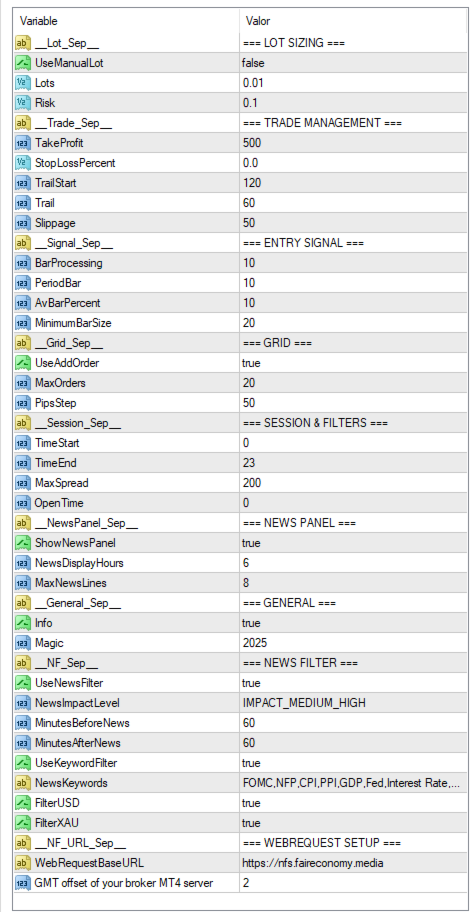
Adjust lot size and risk settings.
Allow WebRequest for the news filter if required.
Delivery and support
After payment is confirmed, you can download this product from your dashboard. The file is delivered instantly; no email delay. For MetaTrader EAs, copy the file to your MT4 or MT5 Data Folder and restart the platform. For TradingView, follow the instructions included with the file. If you have any issues, contact us and we will assist you.
Why buy from us
We offer secure payment, instant delivery, and clear documentation. All products are tested and compatible with current platform versions. You get lifetime access to your purchase and can re-download from your account anytime.
For installation guides and tips, visit our Blog. If you have questions about this product or need support, use the Contact page or email—we are here to help.
Customer reviews
Log in to leave a review after purchase.
- No reviews yet. Be the first to review after purchase.